← Back to CSS
68

Bootstrap 5: grid, utilities and components without friction

Learn how Bootstrap 5 helps you build interfaces quickly with a predictable grid, responsive utility classes and production-ready components, while still requiring enough CSS understanding to use it with good judgment.

📘 Theory

The Bootstrap mindset

You build with standardized pieces instead of inventing every pattern from zero.

Bootstrap offers ready-to-use layout classes and common components such as buttons, alerts, cards, navbars and forms.

Its main advantage is speed with visual consistency, which makes it especially useful in admin panels, internal tools, MVPs and teams that need dependable delivery.

It does not replace understanding CSS fundamentals. Knowing spacing, responsive layout and grid concepts still matters if you want to use Bootstrap well instead of fighting it.

  • Fast for prototypes and internal products.
  • Stable utility system for common UI needs.
  • A strong option when the team needs consistent results with low setup friction.
The 12-column grid

Use `container`, `row` and `col-*` classes to control structure across breakpoints.

1

Each row is divided into 12 columns. You decide how many columns each block occupies at different viewport sizes with classes such as `col-12 col-md-6 col-lg-4`.

2

The approach is mobile-first: base behavior for small screens, then progressive expansion through breakpoints such as `sm`, `md`, `lg` and `xl`.

Utilities and components together

Let the framework solve common structure, then add a light brand layer when needed.

1

Utilities such as `p-3`, `mt-4`, `d-flex` or `text-secondary` cover a surprising amount of day-to-day styling directly in markup.

2

For richer blocks, lean on Bootstrap components first and add a controlled custom CSS layer on top instead of overriding the framework in chaotic ways.

🧭 Key visuals

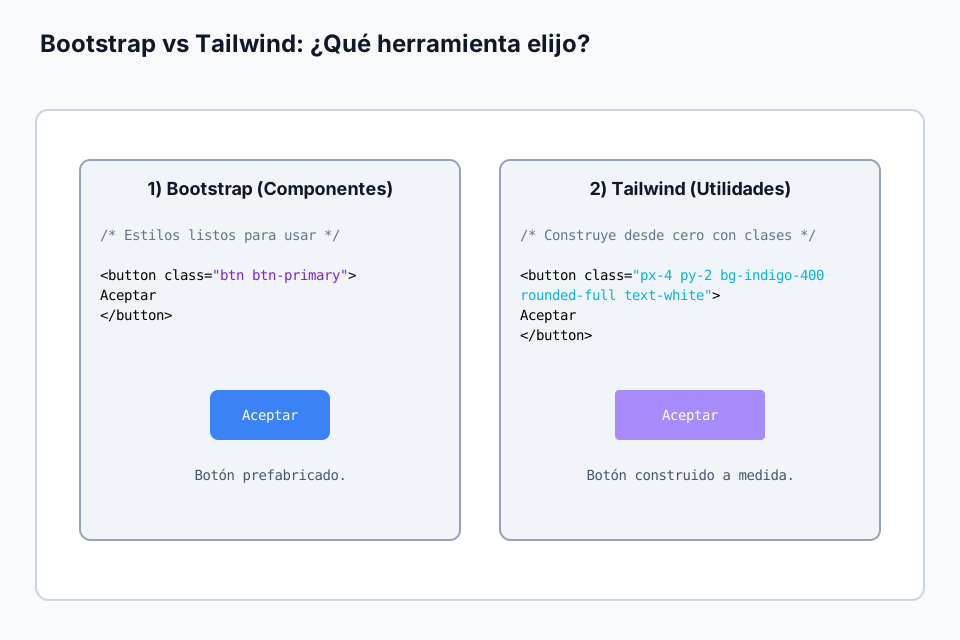
Bootstrap vs Tailwind in workflow terms

Helps you decide which framework fits better according to speed, control and maintainability.

Visual comparison between Bootstrap's component approach and Tailwind's utility-first approach.

🧪 Learn by doing

Example Demo: responsive dashboard cards Build a simple metrics grid with Bootstrap spacing, card components and responsive columns.

🏁 Challenges

Challenge Challenge: three columns on desktop, one on mobile Configure the responsive column classes so the cards stack on small screens and line up in thirds from the medium breakpoint.

🧰 Resources

Test

Check your knowledge with a test about CSS.

Test for CSS

What is this?

I'm Cristian Eslava and I sometimes build websites so both you and I can learn and experiment. culTest

I made this in February 2026 to make learning easier for my students. The idea is to learn web development by practicing and to keep expanding the project with new topics, tests and challenges.

It draws inspiration from MDN, W3Schools, CodePen, Manz and many other web development references. I wanted to combine useful theory, runnable examples, challenges and the testing system I had already built for culTest. culTest

If you liked it, if you didn't, or if you want to get in touch, write to me at cristianeslava@gmail.com