📘 Theory

Grid vs Flexbox

They solve different layout questions, and strong interfaces often use both.

Flexbox is a one-dimensional system: row or column. It is perfect for toolbars, menus, button groups and compact interface rows.

Grid is two-dimensional, so it can coordinate both rows and columns as part of the same structure. That makes it much better for page sections, dashboards, galleries and modular layouts.

In practice, they usually complement each other: Grid shapes the broader structure, while Flexbox aligns the content inside individual components.

  • Flexbox: distribution along one axis.
  • Grid: layout structure across two axes.
  • They are complementary tools, not rivals.
Core Grid concepts

Once the vocabulary is clear, the rest of Grid becomes much easier to reason about.

1

Grid Container

The element with `display: grid`, which defines the overall track structure.

2

Grid Item

A direct child of the Grid container that occupies one or more cells.

3

Grid Line

The lines that define where rows and columns begin and end.

4

Grid Track

The space between two adjacent lines, which becomes one row or one column.

5

Grid Cell

The smallest unit: the intersection of one row and one column.

6

Grid Area

A rectangular zone that can span several cells.

Grid container properties

These define the matrix, the spacing and the automatic flow.

`display: grid` activates the grid formatting context.

`grid-template-columns` and `grid-template-rows` define the base tracks.

The `fr` unit distributes available free space across flexible tracks.

`gap` controls spacing between rows and columns.

`grid-auto-flow` decides how automatically placed items are inserted: by row, by column or with `dense` packing.

`grid-auto-columns` and `grid-auto-rows` size implicit tracks that the browser creates when the explicit grid is not enough.

Useful Grid functions

These functions are what make Grid feel expressive instead of rigid.

1

`repeat()` reduces repetition and makes patterns easier to scan.

2

`minmax()` lets a track stay within a practical range, which is crucial for responsive components.

3

`fit-content()` sizes a track around its content without letting it exceed a chosen limit.

`auto-fill` vs `auto-fit`

Both are responsive, but they do not behave the same once extra space appears.

1

`auto-fill` keeps creating tracks even if some end up empty.

2

`auto-fit` collapses those empty tracks and lets the occupied ones stretch more naturally.

Grid template areas

This is one of the clearest ways to sketch a page layout directly in CSS.

1

You name areas and draw the layout with strings, which can make complex structures much easier to read than raw line numbers.

2

Each item then attaches itself to one of those named regions with `grid-area`.

Alignment inside Grid

Grid gives you both item-level and whole-grid alignment.

  • `justify-items` and `align-items`: align items inside their own cells.
  • `justify-content` and `align-content`: align the whole grid track group inside the container.
  • `place-items`: shorthand for `align-items` + `justify-items`.

Grid item placement

This is where Grid becomes especially powerful for editorial and dashboard-style layouts.

1

`grid-column` and `grid-row` control where an item starts and ends.

2

You can use `span` to declare how many columns or rows an item should occupy.

3

`grid-area` can also connect a child to a named region from the parent layout.

4

`justify-self` and `align-self` let a single item behave differently inside its own cell.

Subgrid

Subgrid lets nested components share the same structural rhythm as the parent grid.

1

`subgrid` allows a child grid to reuse the rows or columns defined by its parent.

2

That is especially useful when cards, panels or repeated modules need their internal elements to align across the larger layout.

3

Support is strong in modern browsers, but compatibility still deserves a quick check when legacy support matters.

Common Grid patterns

These are the patterns where Grid pays off immediately.

  • Page layout with header, sidebar, content and footer using `grid-template-areas`.
  • Responsive galleries with `repeat(auto-fit, minmax(200px, 1fr))`.
  • Dashboards with fixed side columns and elastic content tracks.
  • Card systems with internal consistency through `subgrid`.
  • Featured zones created with spans that enlarge key cards.

🧭 Key visuals

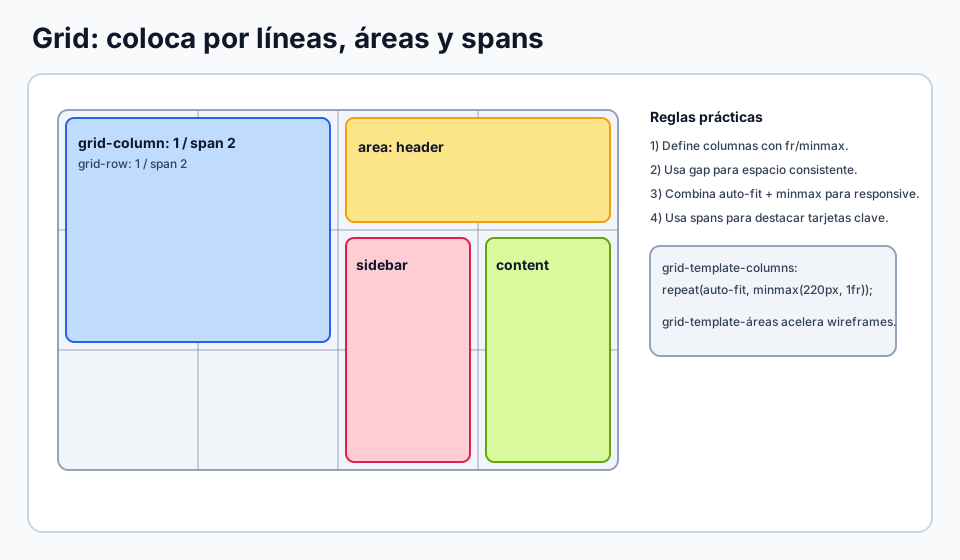
Two-dimensional Grid structure

Summarizes how to position items through lines, named areas and spans.

Grid with areas and spans used to explain placement across two axes.

Flexbox vs Grid depending on the layout problem

It belongs here because it helps learners decide when a one-dimensional solution stops being enough.

Visual comparison between Flexbox and Grid depending on the kind of layout being built

🧪 Learn by doing

Example Interactive demo: play with Grid Change columns, gap and alignment and watch the layout respond live.
Example Layout with named areas A typical web layout using `grid-template-areas`.
Example Auto-fit card grid Resize the viewport and watch the cards reflow automatically.
Example Grid areas for a dashboard-style layout Edit the area map and reshape the layout without touching the HTML.

🏁 Challenges

Challenge Challenge: `grid-template-areas` Define `header`, `main` and `footer` using named areas.
Challenge Challenge: `auto-fit` + `minmax()` Build a responsive card grid.
Challenge Challenge: `subgrid` Align internal columns by inheriting the parent track structure.
Challenge Challenge: dashboard layout with areas Build a realistic structure with a full header, a sidebar and a main content area.

🧰 Resources

CodePen: starter layout with CSS Grid
Open in CodePen

What is this?

I'm Cristian Eslava and I sometimes build websites so both you and I can learn and experiment. culTest

I made this in February 2026 to make learning easier for my students. The idea is to learn web development by practicing and to keep expanding the project with new topics, tests and challenges.

It draws inspiration from MDN, W3Schools, CodePen, Manz and many other web development references. I wanted to combine useful theory, runnable examples, challenges and the testing system I had already built for culTest. culTest

If you liked it, if you didn't, or if you want to get in touch, write to me at cristianeslava@gmail.com