← Back to CSS
07

Basic Selectors: Element, Class and ID

Learn how to target HTML elements with tag, class and id selectors, and how to group selectors when the same rule should apply to several elements.

📘 Theory

Element selectors

Select every element of the same type.

1

Writing the HTML tag name as a selector applies the rule to every element of that type. For example, `p { color: red; }` targets all paragraphs.

2

Element selectors are useful for broad defaults, but they are not very specific. If you only want to style some of those elements, classes are usually the better tool.
Class selectors

Target reusable patterns with class names.

A class is defined in HTML with the `class` attribute and targeted in CSS with a leading dot. For example, `.featured` styles any element that has `class="featured"`.

An element can have more than one class, which makes classes ideal for combining layout, spacing and visual patterns in a flexible way.

  • In CSS: `.name`
  • In HTML: `class="name"`
  • Elements can combine several classes at once.

ID selectors

Target one unique element.

1

An id should be unique within the page. In CSS, `#header` targets the element with `id="header"`.

2

Because ids carry strong specificity, they are not usually the best base for reusable styling. They are more commonly useful for anchors, labels or JavaScript hooks.

Grouping selectors

One rule, several targets.

1

When multiple selectors should share exactly the same declarations, separate them with commas. This keeps the stylesheet shorter and clearer.

2

Grouping is a small habit, but it helps prevent duplication early.

🧭 Key visuals

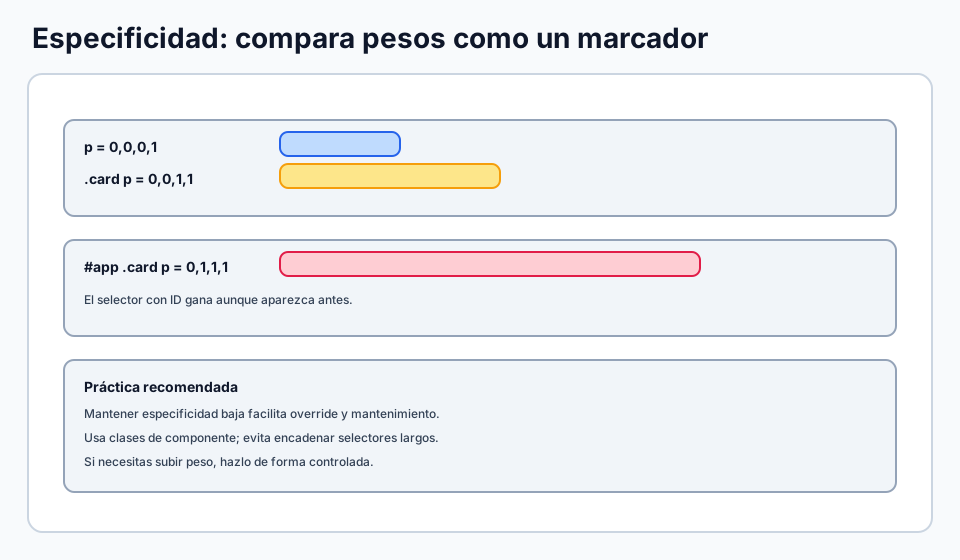
Selectors and rule weight

It builds a bridge between selector choice and later specificity conflicts.

Relationship between CSS selector types and their specificity weight.

🧪 Learn by doing

Example Tag, class and id Change the selectors or the HTML classes and see how the styling behavior changes.

🏁 Challenges

Challenge Challenge: style by class Add a class to the second paragraph and style it separately.
Challenge Challenge: group selectors Apply the same color to `h2` and `h3` using a single grouped selector.

🧰 Resources

Test

Check your knowledge with a test about CSS.

Test for CSS

What is this?

I'm Cristian Eslava and I sometimes build websites so both you and I can learn and experiment. culTest

I made this in February 2026 to make learning easier for my students. The idea is to learn web development by practicing and to keep expanding the project with new topics, tests and challenges.

It draws inspiration from MDN, W3Schools, CodePen, Manz and many other web development references. I wanted to combine useful theory, runnable examples, challenges and the testing system I had already built for culTest. culTest

If you liked it, if you didn't, or if you want to get in touch, write to me at cristianeslava@gmail.com