← Back to JavaScript
13

Arrays in JavaScript: lists with structure and control

Learn how to create, read, loop through and modify arrays while understanding indexes, length and mutation so you can build list logic without common beginner mistakes.

📘 Theory

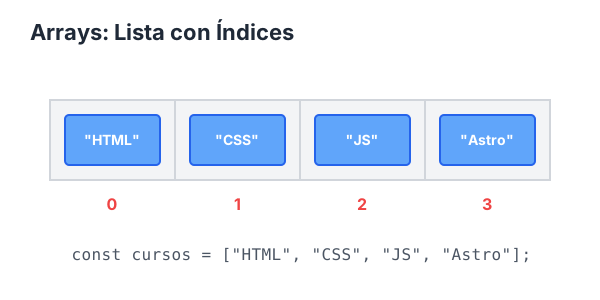
Foundations: index, order and length

Arrays start at index 0, and that rule affects everything else.

The first element of an array is at `arr[0]`, and the `length` property tells you how many elements exist, not what the last index is.

If you access an out-of-range index, you get `undefined`, so it is worth validating boundaries when you loop or inspect specific positions.

  • The first index is `0`.
  • The last valid index is `length - 1`.
  • `length` does not return the last index.
  • An invalid index produces `undefined`.
Controlled mutation with basic methods

`push`, `pop`, `shift` and `unshift` mutate the original array.

These methods are useful in queues, stacks and basic list management. The key is remembering that they modify the array they act on.

Later, when you need immutability, you will see alternatives based on spread syntax and copy-producing methods.

1

push

2

pop

3

unshift

4

shift

Loop through arrays with `for` and `for...of`

Choose the loop based on whether you need the index or just the value.

1

A classic `for` loop gives you precise control over index, step size and stop conditions.

2

`for...of` simplifies reading when you only need each value and not the numeric position.

Daily patterns with arrays

First and last element access, accumulation and simple search are foundational patterns.

These operations appear constantly in real features: show the first or last item, count elements, sum values or verify whether something exists.

Once these patterns feel natural, `map`, `filter` and `reduce` become much easier to learn.

  • First element: `arr[0]`.
  • Last element: `arr[arr.length - 1]` or `arr.at(-1)`.
  • Accumulation: start with `let total = 0` and use a loop.
  • Existence: `includes`; position: `indexOf`.

Array hygiene to avoid bugs

Validate boundaries and avoid accidental mutation when it adds no value.

1

When a list comes from user input or an API, assume it may be empty or incomplete. Check the length before accessing critical indexes.

2

During debugging, printing `length`, the current index and the current value often reveals the mistake in seconds.

🧭 Key visuals

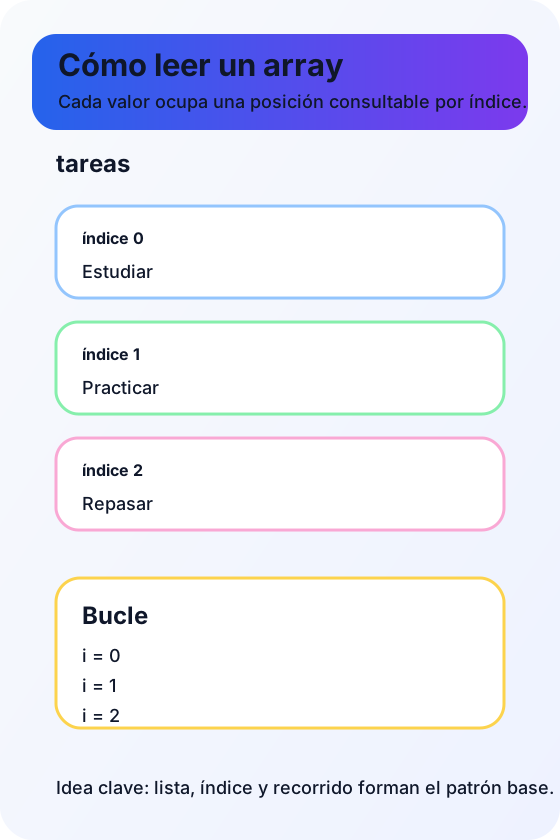
Arrays in JavaScript

It reinforces index-based access, transformation and iteration over collections.

Representation of indexed lists and common operations on arrays

An array as an ordered list

It reinforces the beginner mental model of list, index and iteration, which is exactly what this lesson wants to consolidate.

Diagram of an array as several slots with indexes and a loop that visits each position

🧪 Learn by doing

Example Guided example: add and remove elements Observe how the data changes with `push` and `pop`.
Example Guided example: accumulation with a loop Sum the values of an array using the classic accumulator pattern.
Example Interactive demo: a mini dynamic list Add and remove items so you can visualize the current array state in real time.
Example Interactive demo: mutating methods and reindexing Visualize how `push`, `pop`, `shift`, `unshift`, `sort` and `reverse` change the array and its indexes after each action.

🏁 Challenges

Challenge Challenge 1: sum a numeric array Loop through an array of numbers and calculate the accumulated total.
Challenge Challenge 2: first and last element Access the beginning and the end of an array using the correct indexes.

🧰 Resources

CodePen: JavaScript patterns and quality
Open in CodePen

What is this?

I'm Cristian Eslava and I sometimes build websites so both you and I can learn and experiment. culTest

I made this in February 2026 to make learning easier for my students. The idea is to learn web development by practicing and to keep expanding the project with new topics, tests and challenges.

It draws inspiration from MDN, W3Schools, CodePen, Manz and many other web development references. I wanted to combine useful theory, runnable examples, challenges and the testing system I had already built for culTest. culTest

If you liked it, if you didn't, or if you want to get in touch, write to me at cristianeslava@gmail.com