← Back to JavaScript
33

Detect the user's language and redirect to the right version

Read the browser language, normalize locale values and redirect safely to the correct language version without loops or a frustrating user experience.

📘 Theory

What problem this redirect actually solves

Language detection is not a trick. It is a friction-reduction pattern for international sites.

Imagine a landing page with Spanish, English and French versions. If someone enters through the root path, sending them to the best-fitting version can save an unnecessary decision.

But the redirect should not fight the user. Once someone has chosen a language manually, that preference deserves more weight than browser defaults.

1

Input

The visitor arrives at `/` or another neutral entry point.

  • No language fixed yet
  • No stored preference yet
2

Decision

The app checks browser preference and actual support.

  • `navigator.languages`
  • supported locale map
3

Output

The app resolves a route or a fallback.

  • `/es/`
  • `/en/`
  • `/fr/`

Read the browser locale without over-assuming

`navigator.language` is useful, but `navigator.languages` often gives a better picture.

1

`navigator.language` gives the primary browser locale, such as `en-US` or `es-ES`. That is enough for simple cases but it does not tell you about secondary preferences.

2

`navigator.languages`, when available, returns an ordered list. That lets you try the strongest preference first and fall back to the next supported option.

Normalize the locale and map it to a real route

Browsers return regional variants, while your site often works with base language codes.

1

A site may support `es`, `en` and `fr`, while the browser returns `es-MX`, `en-US` or `fr-CA`. That is why normalization should usually reduce the locale to its base language code.

2

A single object of supported locales makes adding new languages much simpler than scattering conditionals throughout the code.

Redirect without loops or history frustration

The biggest bug is usually not detection. It is redirecting too aggressively.

1

Before redirecting, check whether you are already on the correct path. If you skip that step, the site may perform pointless redirects or feel unstable.

2

In this use case, `window.location.replace()` is often better than assigning `href`, because it avoids leaving a useless redirecting entry in the browser history.

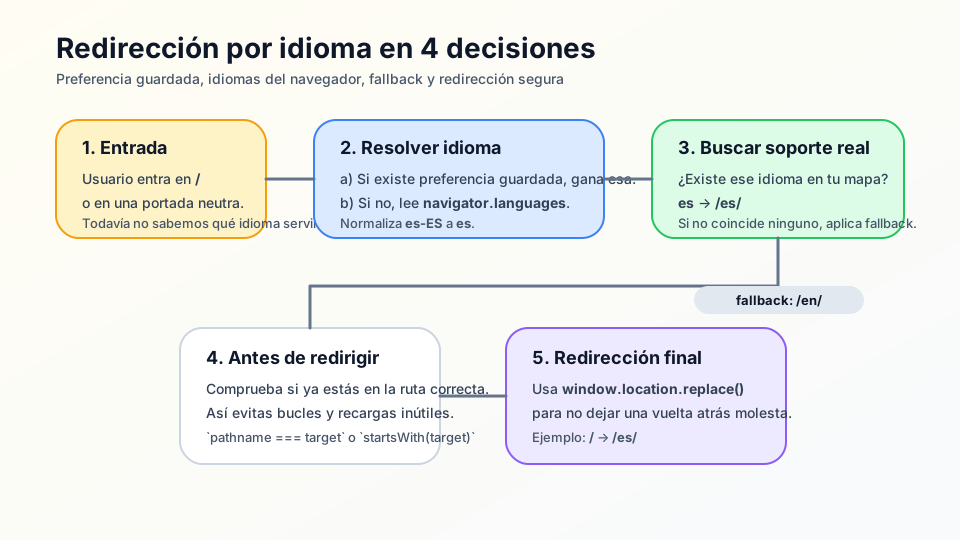
🧭 Key visuals

Language detection and redirect flow

It summarizes the decision chain from saved preference to fallback route and final redirect.

Diagram of browser languages being normalized into a supported locale and a safe redirect

🧪 Learn by doing

Example Interactive demo: see which route your site would choose Simulate browser preferences and a saved language choice before any real redirect happens.

🏁 Challenges

Challenge Challenge: build `getLocaleRoute()` with a reliable fallback Create a function that receives a list of browser locales and returns the correct route according to supported languages.

What is this?

I'm Cristian Eslava and I sometimes build websites so both you and I can learn and experiment. culTest

I made this in February 2026 to make learning easier for my students. The idea is to learn web development by practicing and to keep expanding the project with new topics, tests and challenges.

It draws inspiration from MDN, W3Schools, CodePen, Manz and many other web development references. I wanted to combine useful theory, runnable examples, challenges and the testing system I had already built for culTest. culTest

If you liked it, if you didn't, or if you want to get in touch, write to me at cristianeslava@gmail.com