← Back to JavaScript
24

Applied DOM work: render, update and debug interfaces without chaos

Learn how to work with the DOM in real interface flows: reliable node selection, dynamic list rendering, visual state updates and patterns that avoid fragile manipulation.

📘 Theory

A DOM working model: from data to screen

Do not think in isolated nodes. Think in a render flow.

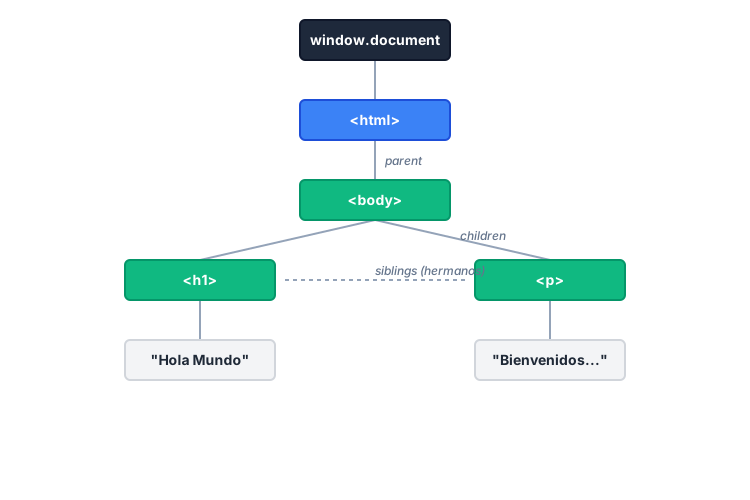
The browser keeps a tree of nodes in memory. Your code is not writing magical HTML. It is reading and changing specific properties of that tree.

A practical mental order is: read state, decide changes, apply changes. That order reduces many visual synchronization mistakes.

1

Read

Capture references and current state.

  • `querySelector` and `getElementById`
  • `dataset`, `value`, `textContent`
2

Decide

Keep the rule in plain JavaScript first.

  • Clear `if` and `else` logic
  • Named intermediate booleans
3

Apply

Mutate the UI in a controlled way.

  • `classList.add/remove/toggle`
  • `append` and `replaceChildren`

Reliable selection and visual state updates

A fragile selector today often becomes a bug tomorrow.

1

Avoid selectors that depend too much on presentational structure. Prefer stable ids or dedicated behavior classes, and cache important references in well-named constants.

2

For status changes, combine `textContent`, `classList` and accessibility attributes such as `aria-live` so the UI state is explicit and testable.

Render dynamic lists safely

Build the nodes first, then mount the whole batch.

When you need to insert several elements, a `DocumentFragment` keeps the rendering logic cleaner and avoids repeated small updates on the live tree.

That pattern works like a small batch update: prepare everything first, then replace the content in one explicit step.

  • Validate critical DOM references early.
  • Avoid relying on `innerHTML` for every update if you also need stable behavior and structure.
  • Trace important UI changes while developing so state and render stay aligned.

🧭 Key visuals

DOM with JavaScript

It connects events, state and interface rendering in the browser.

Diagram of selection, update and render flow in the DOM

🧪 Learn by doing

Example Guided example: order status card Update the text and style of a card according to backend states such as pending, shipped and delivered.
Example Interactive demo: a task panel with a live counter Add tasks, render the list and update the visible count in real time.

🏁 Challenges

Challenge Challenge 1: live search filter for a list Filter `<li>` elements based on what the user types and hide the items that do not match.

What is this?

I'm Cristian Eslava and I sometimes build websites so both you and I can learn and experiment. culTest

I made this in February 2026 to make learning easier for my students. The idea is to learn web development by practicing and to keep expanding the project with new topics, tests and challenges.

It draws inspiration from MDN, W3Schools, CodePen, Manz and many other web development references. I wanted to combine useful theory, runnable examples, challenges and the testing system I had already built for culTest. culTest

If you liked it, if you didn't, or if you want to get in touch, write to me at cristianeslava@gmail.com