📘 Theory

Variables as small models of reality

A variable represents a real piece of state in your application at a specific moment.

A price, an authenticated user or the number of items in a cart are all pieces of data that change through interaction. Variables capture that state so your logic can work with it.

If the data is badly modeled or badly named, the logic becomes confusing and debugging gets expensive very quickly.

1

What to store

2

Where to use it

3

What to avoid

4
Result

`const` and `let` in real work

Use `const` by default and `let` only when reassignment is genuinely required.

`const` protects you from accidental reassignment and communicates stability. `let` expresses that the value is expected to change as the flow moves forward.

That discipline reduces bugs and improves collaborative reading because anyone reviewing the code quickly sees which values stay stable and which ones evolve.

  • Use `const` for labels, configuration and fixed results.
  • Use `let` for counters, accumulators and interface state.
  • Avoid `var` in modern code.
  • If you are unsure, start with `const` and switch to `let` only if needed.

Primitive types you should recognize quickly

Fast type recognition saves hours of debugging later.

At the beginner level you will mostly work with `string`, `number`, `boolean`, `undefined` and `null`. Each of them behaves differently in operations and comparisons.

`typeof` is your instant inspection tool when you suspect a value is not what you expected.

  • `string`: text such as `'Ana'`.
  • `number`: integers and decimals such as `42` or `3.5`.
  • `boolean`: `true` or `false`.
  • `undefined`: a declared variable with no assigned value.
  • `null`: an intentional absence of value.

Interpolation with template literals

Build readable messages without fragile concatenation.

1

Using backticks and `${}` makes logs, interface text and calculation summaries much clearer.

2

It also avoids long `+` chains that often introduce formatting and readability mistakes.

Coercion and conversions: avoid surprises

When you mix types, JavaScript may convert for you and not always in the way you expect.

1

`'2' + 2` produces `'22'` because the `+` operator concatenates when a string is involved. In contrast, `'2' * 2` produces `4` because JavaScript performs numeric conversion.

2

In user inputs and forms, convert explicitly with `Number(...)` before doing calculations.

🧭 Key visuals

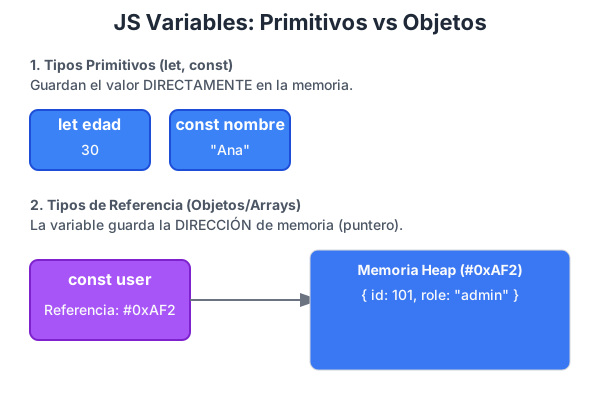
Variables in JavaScript

A visual aid for understanding declaration, reassignment and the basic role of variables.

Diagram showing declaration and use of variables in JavaScript

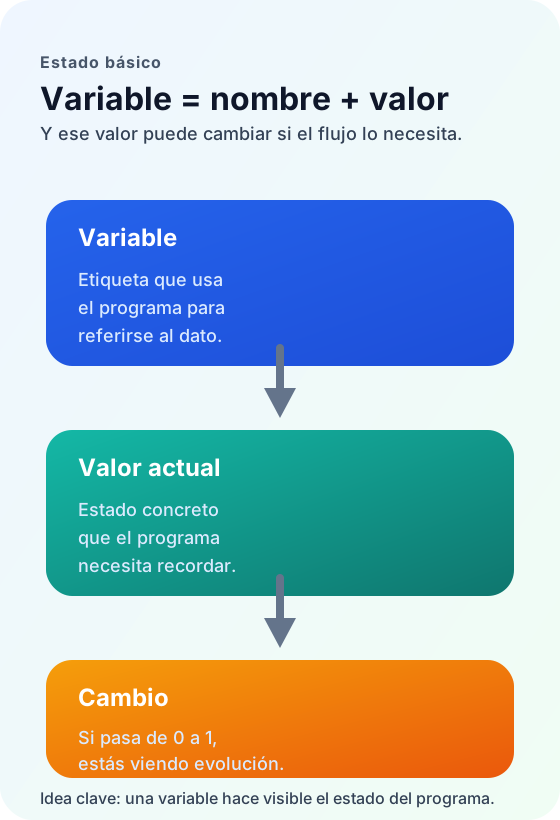
A variable as a state container

It reinforces the most important beginner idea: a variable is not only syntax, but a way to represent state.

Visual scheme presenting a variable as a name, a current value and a changing state inside a program

🧪 Learn by doing

Example Guided example: `const` and `let` in a simple flow Separate a stable piece of data from a mutable one in a small sequence of actions.
Example Guided example: type audit Check types in the console before operating on your data.
Example Interactive demo: student profile from variables Edit a few values and see how variables feed a small live profile card.
Example Interactive demo: live state with `let` and `const` Change the mutable values and compare them with a constant value that stays stable across the interaction.

🏁 Challenges

Challenge Challenge 1: product card with a calculation Declare variables and build a clear output with a template literal.
Challenge Challenge 2: type diagnostics with `typeof` Declare variables with different types and validate each one in the console.

What is this?

I'm Cristian Eslava and I sometimes build websites so both you and I can learn and experiment. culTest

I made this in February 2026 to make learning easier for my students. The idea is to learn web development by practicing and to keep expanding the project with new topics, tests and challenges.

It draws inspiration from MDN, W3Schools, CodePen, Manz and many other web development references. I wanted to combine useful theory, runnable examples, challenges and the testing system I had already built for culTest. culTest

If you liked it, if you didn't, or if you want to get in touch, write to me at cristianeslava@gmail.com