📘 Theory

Why centering used to be frustrating

Modern alignment is much simpler because the browser finally gives us the right primitives.

1

Before Flexbox and Grid, vertical centering often meant brittle tricks: absolute positioning plus transforms, fake table cells, negative margins or line-height hacks.

2

Those approaches were fragile, hard to maintain and easy to break when content became dynamic.

3

Today, modern layout systems give us native, readable and production-safe tools for the same job.
Understand the axes first

Most alignment confusion disappears once the axes are clear.

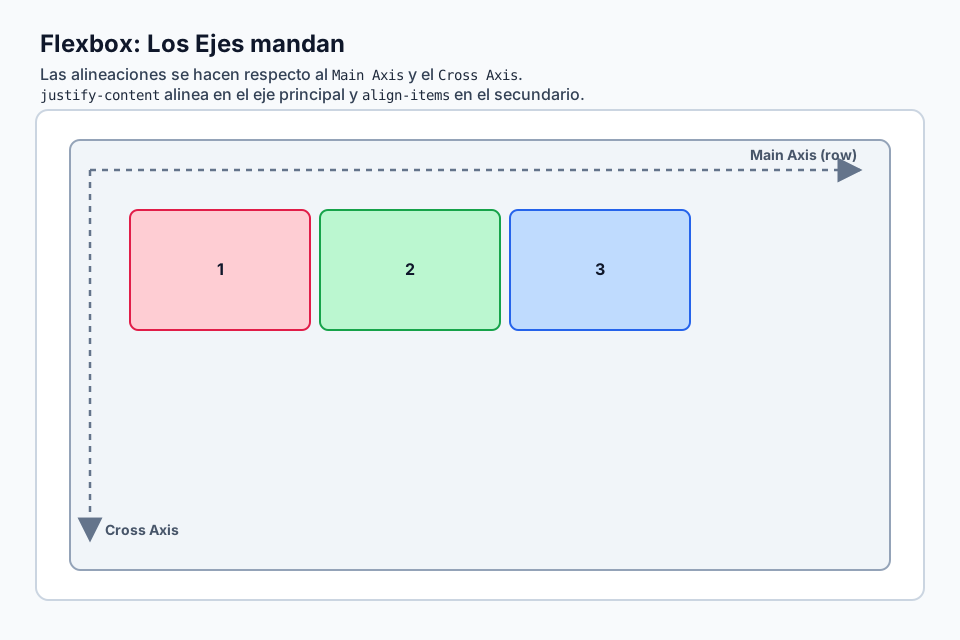
In Flexbox, the main axis is horizontal by default because `flex-direction: row` is the default. The cross axis is vertical.

If you switch to `flex-direction: column`, those roles flip: the main axis becomes vertical and the cross axis becomes horizontal.

`justify-content` always works on the main axis, while `align-items` works on the cross axis.

In Grid, `justify-*` is tied to the inline axis and `align-*` to the block axis, which makes the mental model more stable.

  • `justify-content` and `justify-items`: inline axis in Grid, main axis in Flexbox.
  • `align-content` and `align-items`: block axis in Grid, cross axis in Flexbox.
  • `place-items`: shorthand for `align-items` + `justify-items`.
  • `place-content`: shorthand for `align-content` + `justify-content`.

Four modern centering techniques

Each one shines in a slightly different kind of layout.

1

1. Grid + `place-items: center` is the shortest option when you want to center a single child or several independent children.

2

2. Flexbox + `justify-content` + `align-items` works especially well for dynamic content, stacked layouts and component groups.

3

3. `margin: auto` inside Flex or Grid is elegant when only one child needs to absorb the remaining space and land in the middle.

4

4. Grid + `place-content: center` centers the whole grid as one group, which is not the same as centering every item individually.

`place-items` vs `place-content`

They can look similar with one element, but they solve different problems.

1

`place-items` aligns each item inside its own assigned area.

2

`place-content` aligns the entire track group inside the container.

3

With a single child, both can look identical. With multiple items, the distinction becomes important very quickly.

Real layout decisions

The best technique depends on what is actually moving and what stays fixed.

  • Centered modal or dialog: Grid + `place-items` or classic Flexbox.
  • Hero section with vertically centered copy: Flexbox with `flex-direction: column`.
  • Compact card with centered content: Grid + `place-items` is often the cleanest choice.
  • Navbar with logo and menu: Flexbox + `space-between`, not total centering.
  • Sticky footer layout: Flexbox on `body` with `flex-direction: column` plus `margin-top: auto` on the footer.
  • Centered gallery cells: Grid + per-cell alignment.
  • Centered form wrapper: Grid + `place-items` for the shortest readable solution.

What to remember

A few rules of thumb save a lot of trial and error.

1

The hacks are gone

You no longer need `position: absolute`, transform tricks, fake tables or negative margins for most centering tasks.

2

Grid is the shortest path

For simple full centering, `display: grid` plus `place-items: center` is usually the most direct solution.

3

Flexbox is more conversational

When content grows, wraps or changes direction, Flexbox often gives you more comfortable control.

4

`margin: auto` is underrated

Inside Flex or Grid, it can absorb free space in a very elegant way.

5

`place-*` are shorthands

They reduce boilerplate without changing the underlying alignment model.

6

Axes matter more than memorization

If you understand the axes, `justify-*` and `align-*` stop feeling arbitrary.

7

Height still matters

If you want full-screen vertical centering, the container needs enough height, often `min-height: 100vh`.

🧭 Key visuals

Flexbox alignment axes

Use this diagram to connect `justify-content` and `align-items` to the correct axis depending on direction.

Main and cross axes used to understand Flexbox alignment.

🧪 Learn by doing

Example Demo: Grid vs Flexbox vs `margin: auto` Switch between the three main centering techniques and compare how each one behaves.
Example Demo: `place-items` vs `place-content` See the difference between centering individual items and centering the grid as a group.
Example Example: centered modal A realistic overlay and modal using Grid + `place-items`.
Example Example: hero section with Flexbox A vertically centered hero using `flex-direction: column`.

🏁 Challenges

Challenge Challenge: center a modal with Grid Use `place-items` to center the modal across the full screen.
Challenge Challenge: center a card with Flexbox Use Flexbox to center a card across both axes.
Challenge Challenge: center with `margin: auto` Use the `margin: auto` trick inside a Flex context.

What is this?

I'm Cristian Eslava and I sometimes build websites so both you and I can learn and experiment. culTest

I made this in February 2026 to make learning easier for my students. The idea is to learn web development by practicing and to keep expanding the project with new topics, tests and challenges.

It draws inspiration from MDN, W3Schools, CodePen, Manz and many other web development references. I wanted to combine useful theory, runnable examples, challenges and the testing system I had already built for culTest. culTest

If you liked it, if you didn't, or if you want to get in touch, write to me at cristianeslava@gmail.com