← Back to CSS
47

CSS animations: transitions, keyframes and micro-interactions

Combine transitions and `@keyframes` to bring UI to life with smooth hover states, loaders, pulses and more controlled motion patterns.

📘 Theory

Core ideas at a glance

A quick recap of the concepts you will reuse most often.

1

Transitions

Smooth state changes for hover, focus and active interactions.

2

Keyframes

Animation sequences defined from 0% to 100%.

3

Timing

Control pacing with `ease`, `linear` or `cubic-bezier()`.

4

Performance

Animate `transform` and `opacity` to avoid heavier repaint and layout work.
Transitions with `transition`

1

A transition defines which property changes over time, how long the change lasts and which easing curve it follows.

2

For micro-interactions, `transform` is often the safest and cleanest property to animate.

Animations with `@keyframes`

1

Keyframes define a motion path and `animation` applies it with a duration, easing and iteration strategy.

2

Try `animation-direction: alternate` when you want the movement to feel more organic and less abrupt.

`animation-range` inside a linked animation

🧭 Key visuals

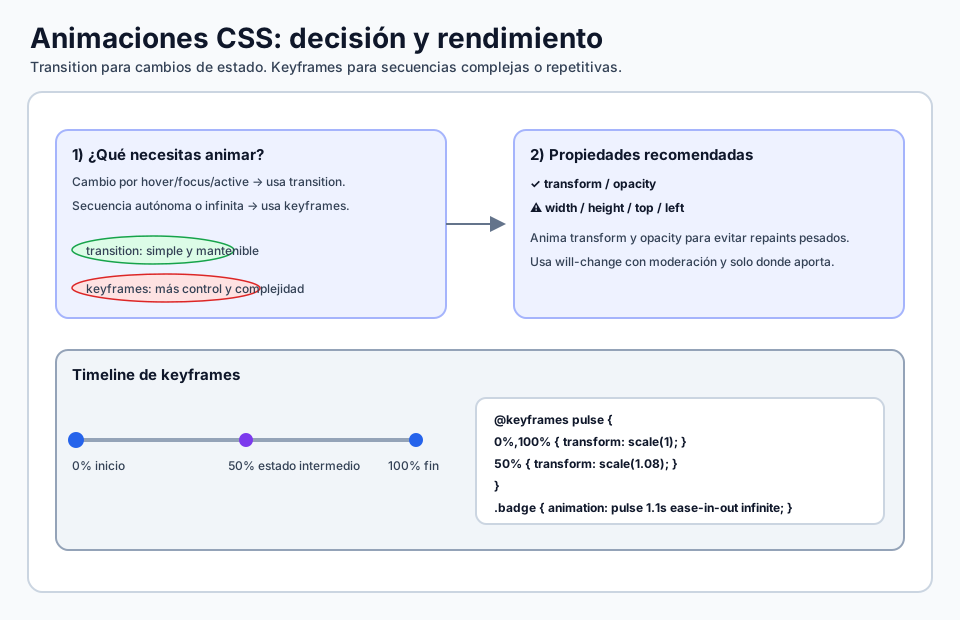
Decision flow for animating with CSS

Summarizes the technical decision process for fluid and maintainable animation in real interfaces.

Diagram showing when to use transition or keyframes and which properties are safer to animate.

🧪 Learn by doing

Example Interactive demo: transitions and animations Change duration, easing and animation type to compare the behavior.
Example Card with a hover transition
Example Keyframes: spinner plus pulse Edit the animation duration or easing and try pausing the effect on hover.

🏁 Challenges

Challenge Challenge: button transition Complete the button transition and hover state.
Challenge Challenge: pulse with keyframes Create a pulse animation with `@keyframes`.

🧰 Resources

Test

Check your knowledge with a test about CSS.

Test for CSS
CodePen: keyframes and transform
Open in CodePen

What is this?

I'm Cristian Eslava and I sometimes build websites so both you and I can learn and experiment. culTest

I made this in February 2026 to make learning easier for my students. The idea is to learn web development by practicing and to keep expanding the project with new topics, tests and challenges.

It draws inspiration from MDN, W3Schools, CodePen, Manz and many other web development references. I wanted to combine useful theory, runnable examples, challenges and the testing system I had already built for culTest. culTest

If you liked it, if you didn't, or if you want to get in touch, write to me at cristianeslava@gmail.com