← Back to CSS
18

Advanced Backgrounds: Layers, Clip and Real UI Composition

Master modern `background` usage with shorthand syntax, multiple layers and practical UI patterns that avoid relying on heavy image assets.

📘 Theory

Modern shorthand and layer order

Think in layers like a design file, but implemented directly in CSS.

The `background` shorthand lets you define image, position, size, repeat and fallback in one place. A common pattern is `center / cover no-repeat` for hero-style surfaces.

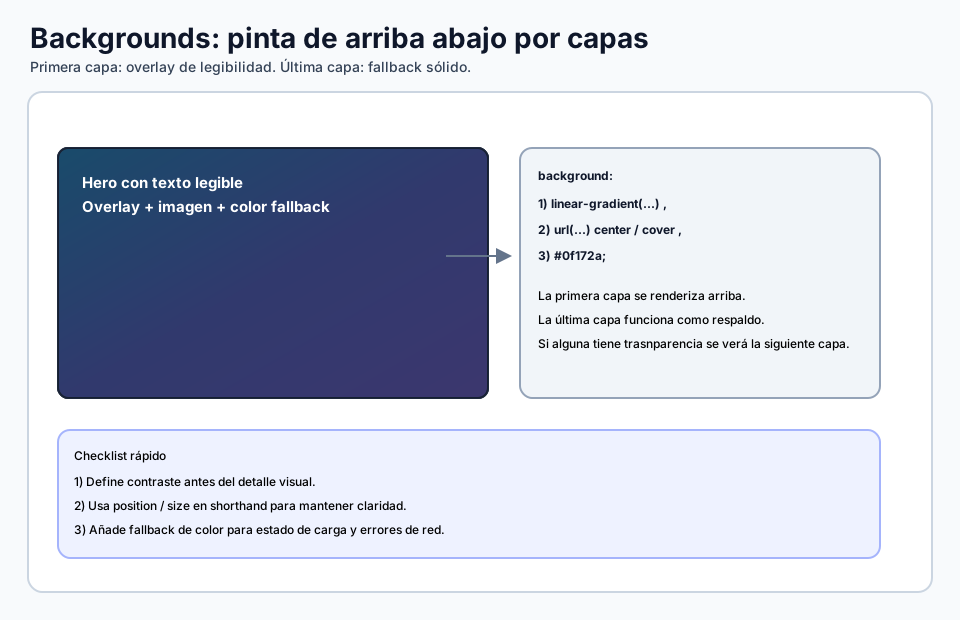
When you use multiple layers, the first one sits on top. That makes it easy to place a dark gradient overlay above a photo so text remains readable without modifying the original image.

  • First layer: painted on top.
  • Last layer: often works well as the color fallback.
  • `position / size` is clearer when written together.
Patterns without images

Fewer requests, more control.

1

With `repeating-linear-gradient` and `repeating-radial-gradient`, you can create stripes, dots and light grid patterns without external image files.

2

That is especially useful in dashboards, skeleton states or technical-looking surfaces where the pattern should stay light and scalable.

background-clip and background-origin for advanced borders

Useful when you want polished edges without extra pseudo-elements.

1

A practical pattern is to use one background for the fill and another one for the border. That gives you gradient borders while keeping the inside surface stable.

2

With `padding-box` and `border-box`, you decide exactly where each background layer should be painted.

image-set and robust fallbacks

Serve the right image density without duplicating the whole rule.

`image-set()` lets you declare 1x and 2x variants so the browser can choose a sharper background on high-density screens.

Even then, keep a background color fallback so the block still feels intentional while the image is loading.

  • Use `image-set()` when the background image is visually important.
  • Pair it with `background-color` for a calmer loading state.
  • Avoid oversized assets on small screens when they do not add real value.

🧭 Key visuals

Background layers and paint order

It shows how a professional background is composed and why the first layer appears on top.

Diagram of CSS background layers with overlay, image and fallback color in rendering order.

🧪 Learn by doing

Example Guided demo: multilayer hero Adjust the overlay, positioning and size to keep the text readable on top of an image-heavy hero.
Example Interactive demo: visual cutouts with CSS mask Try radial masks, spotlight effects, stripes, fades and text-based reveals to understand how composition changes without editing the original image.

🏁 Challenges

Challenge Challenge: card with texture + gradient + fallback Compose three background layers and keep enough contrast for light text.

🧰 Resources

What is this?

I'm Cristian Eslava and I sometimes build websites so both you and I can learn and experiment. culTest

I made this in February 2026 to make learning easier for my students. The idea is to learn web development by practicing and to keep expanding the project with new topics, tests and challenges.

It draws inspiration from MDN, W3Schools, CodePen, Manz and many other web development references. I wanted to combine useful theory, runnable examples, challenges and the testing system I had already built for culTest. culTest

If you liked it, if you didn't, or if you want to get in touch, write to me at cristianeslava@gmail.com