← Back to CSS
19

CSS Mask: Cutouts, Fades and Text Without Editing Images

Use `mask-image`, gradients and SVG to create visual cutouts, fades and focus effects without modifying the original asset.

📘 Theory

What a mask really does

It does not modify the asset. It modifies visibility.

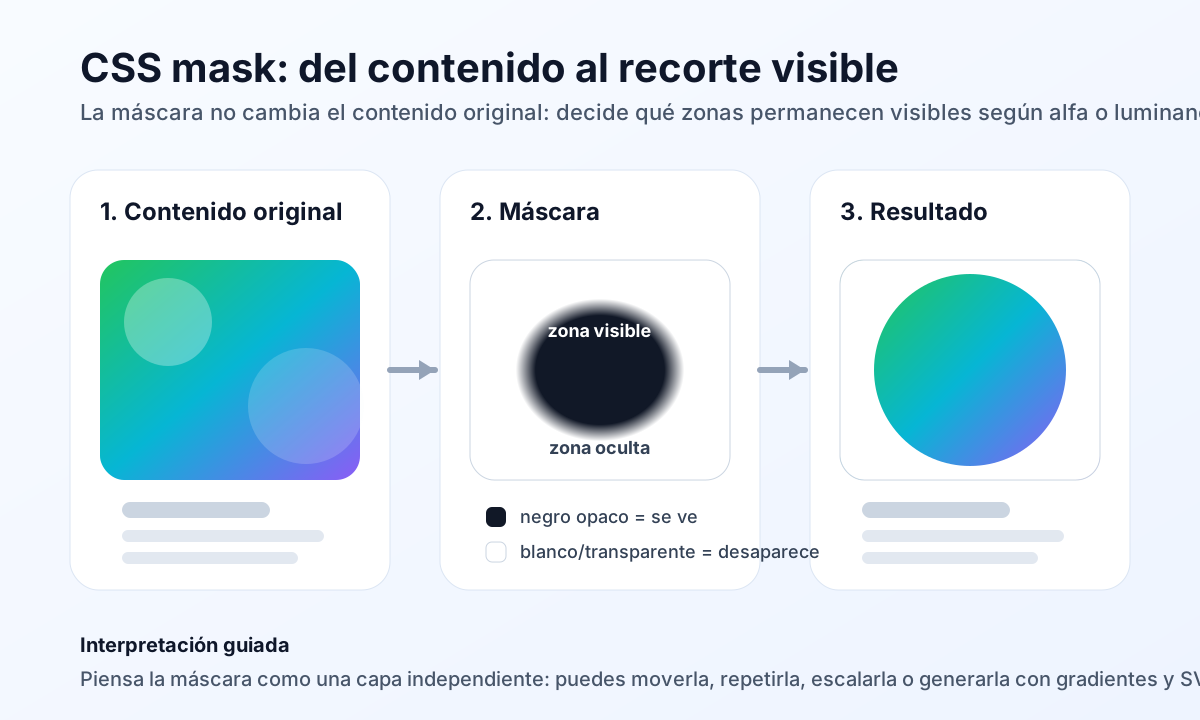
A mask acts as an intermediate layer between the original content and the final rendering. Opaque areas remain visible, while transparent areas disappear.

That makes masks useful whenever you want to direct attention, soften the edge of a surface or reveal only one meaningful area of a block.

  • It works on images, backgrounds and full blocks.
  • You can generate it with gradients, inline SVG or external mask assets.
  • It scales better than exporting separate raster versions for every visual variant.
Gradients as masks: fade, spotlight and stripes

The most practical entry point starts with `linear-gradient()` and `radial-gradient()`.

1

A `linear-gradient()` mask is ideal for vertical or horizontal fades. A `radial-gradient()` mask works better for spotlight effects, circular reveals or attention zones.

2

When you need more control, you can combine layers and tune them with `mask-size`, `mask-position` and `mask-repeat`.

Masks with SVG and text

When gradients are not enough, SVG gives you more precise control over the shape.

SVG is especially helpful for giant letters, irregular geometry or brand-driven cutouts. Instead of exporting many raster variants, you can keep the content live and change only the mask.

This approach works well in editorial heroes, course covers and promotional blocks where you want stronger visual personality without losing flexibility.

  • Large text as a mask for editorial headlines.
  • Organic or geometric shapes with more precision than a gradient alone.
  • Strong pairing with hover and scroll-based animation work.

Compatibility and graceful fallback

The effect is useful, but it should never make the interface brittle.

1

In WebKit-based browsers, it is still common to declare both `mask-*` and `-webkit-mask-*`. If the cutout is decorative, a fallback can simply show the full content with no masking at all.

2

If the effect matters to comprehension, wrap it in `@supports` or degrade it to a simpler version with rounded corners, an overlay or `clip-path`.

Animating clip-path with intent

🧭 Key visuals

How a CSS mask works

It explains the mental model behind `mask`: base content, visibility layer and final cutout result.

Diagram showing original content, mask layer and final rendered result after applying CSS mask.

🧪 Learn by doing

Example Interactive demo: visual CSS mask generator Explore fades, spotlight effects, stripes and text-based reveals to understand how `mask-image`, `mask-size` and `mask-position` behave in real time.
Example Guided demo: card with a bottom fade Apply a linear mask to soften the lower edge of an image and leave breathing room for the content.

🏁 Challenges

Challenge Challenge: spotlight over a decorative image Create a centered focus area with `radial-gradient()` and prevent the mask from repeating.

🧰 Resources

What is this?

I'm Cristian Eslava and I sometimes build websites so both you and I can learn and experiment. culTest

I made this in February 2026 to make learning easier for my students. The idea is to learn web development by practicing and to keep expanding the project with new topics, tests and challenges.

It draws inspiration from MDN, W3Schools, CodePen, Manz and many other web development references. I wanted to combine useful theory, runnable examples, challenges and the testing system I had already built for culTest. culTest

If you liked it, if you didn't, or if you want to get in touch, write to me at cristianeslava@gmail.com