← Back to CSS
62

Cascade Layers (`@layer`): organize priority without specificity wars

Structure CSS with `@layer` so priority is explicit, conflicts are reduced and styles scale without leaning on `!important`.

📘 Theory

Why use layers

Fewer conflicts and a more scalable architecture.

1

Without layers, many styling bugs get fixed by increasing specificity with longer selectors or `!important`. That may solve the symptom, but it scales badly and makes the system harder to maintain.

2

With `@layer`, you define a priority hierarchy on purpose from the start. That lets the architecture decide who wins, not brute force.

3

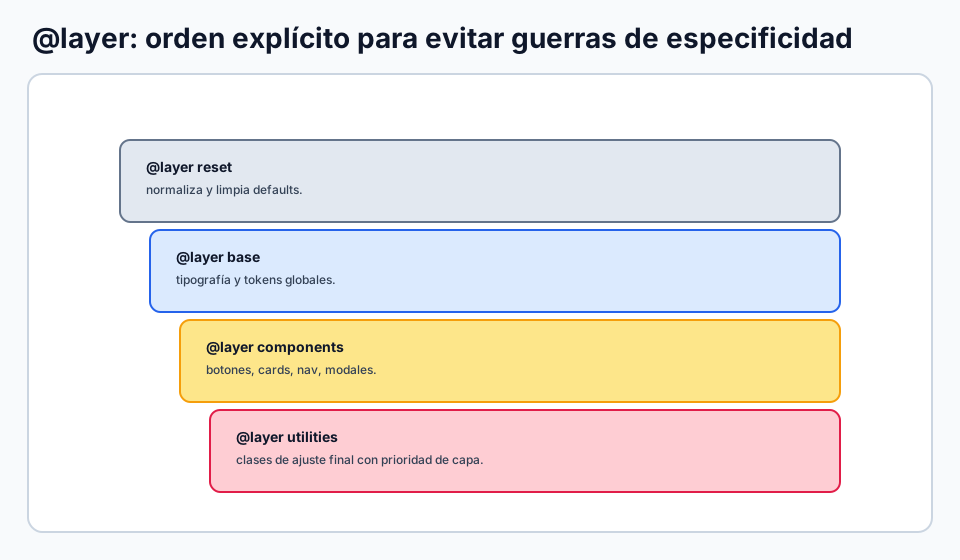
A practical pattern is: reset -> framework -> base -> components -> utilities -> overrides.
The key priority rules

  • The cascade compares layers before it compares specificity.
  • A class in a higher-priority layer can beat an ID in a lower-priority layer.
  • Avoid leaving critical rules outside layers by accident, because they can break the intended priority contract.
  • Document what each layer is for so the whole team writes CSS with the same logic.

Integrate external libraries without losing control

1

If you import third-party CSS, assign it to a specific layer so it does not compete chaotically with your own styles.

2

That way you can override a library from a higher layer instead of reaching for complex selectors.

Practical syntax

  • Declare the global layer order first.
  • Write rules inside each `@layer` block afterward.
  • Keep one canonical layer header in your global CSS.
  • Do not rely on IDs or `!important` to force priority if a layer decision would solve the issue more cleanly.

Recommended strategy in a real project

1

Define one stable layer header near the start of your global CSS. That prevents each file from inventing its own priority model.

2

Use `components` for UI pieces and `utilities` for small atomic adjustments. If something should win, move it to the right layer instead of inflating specificity.

3

In code review, check whether a change respects the layer contract before accepting an `!important` fix.

Rules outside layers

1

Rules that are not inside a normal layer can outrank layered styles, so use them carefully for intentional exceptions only.

2

In larger teams it helps to document when something is allowed to stay outside the layer system.

3

If you need to roll back a value from a specific layer, `revert-layer` can help in more advanced cases.

🧭 Key visuals

Layer order with `@layer`

Defines priority by architecture instead of inflating specificity.

CSS layer stack with reset, base, components and utilities.

🧪 Learn by doing

Example Demo: priority by layer See how a simple class can beat a more specific selector because its layer has higher priority.
Example Interactive demo: layer order in a tiny system Change the order of the layers and see the result shift without touching specificity.

🏁 Challenges

Challenge Challenge: priority without `!important` Define two layers and prove that architecture, not brute force, decides the result.

🧰 Resources

Test

Check your knowledge with a test about CSS.

Test for CSS

What is this?

I'm Cristian Eslava and I sometimes build websites so both you and I can learn and experiment. culTest

I made this in February 2026 to make learning easier for my students. The idea is to learn web development by practicing and to keep expanding the project with new topics, tests and challenges.

It draws inspiration from MDN, W3Schools, CodePen, Manz and many other web development references. I wanted to combine useful theory, runnable examples, challenges and the testing system I had already built for culTest. culTest

If you liked it, if you didn't, or if you want to get in touch, write to me at cristianeslava@gmail.com