← Back to CSS
57

CSS Nesting: the end of repetitive selectors

Write more hierarchical and maintainable style sheets with native CSS nesting, reducing selector repetition without relying on a preprocessor.

📘 Theory

Why nest at all?

Write CSS that follows the shape of the HTML.

Traditionally, if you had a menu with links and hover states, you had to repeat `.nav` in every rule: `.nav { ... }`, `.nav a { ... }`, `.nav a:hover { ... }`. That repetition is tedious and scatters the logic of the component.

With CSS Nesting, the styles for that component can live inside the main selector block. That makes renaming or moving the component easier and helps the file stay easier to scan.
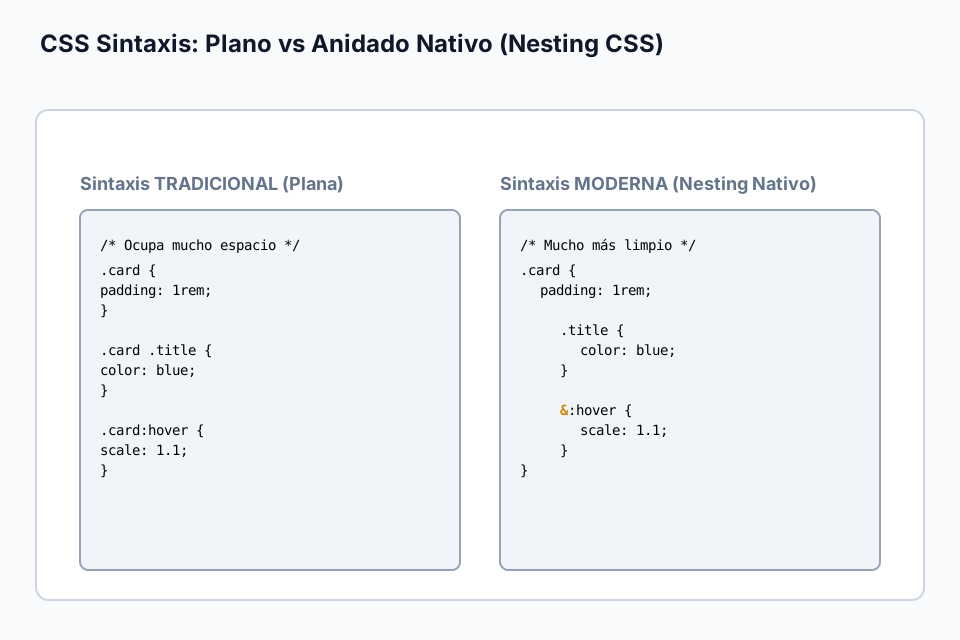
The power of the ampersand (`&`)

Referencing the current parent selector.

The `&` symbol is the nesting selector. It represents the current parent selector and is especially useful in three situations.

1. **Pseudo-classes**: `&:hover` or `&:focus`.

2. **Pseudo-elements**: `&::before` or `&::after`.

3. **Combined selectors**: `&.is-active` when the parent has an extra class.

Technical note: in modern native CSS, `&` is no longer strictly required for every simple nested child selector, but using it deliberately still helps avoid ambiguity and improves readability.

Watch the specificity

Native nesting is not identical to Sass.

1

A key difference from Sass is how specificity is calculated. In native CSS, nesting behaves internally more like `:is()`, which means the final specificity can be influenced by the most specific selector in the group.

2

You do not need to memorize every detail to work well with it. The practical rule is simple: avoid nesting deeper than about three levels so the CSS stays predictable and easier to debug.

Good nesting practices

Keep the CSS organized instead of burying it.

1

1. **Limit depth**: avoid going beyond three levels so specificity and performance stay under control.

2

2. **Use `&` for states and combinations**: this makes the selector intent easier to read.

3

3. **Group related styles**: keep the logic of the same component together instead of splitting it across the file.

Current limitations

What native nesting still does not replace.

1

Although native nesting is powerful, it does not replace everything a preprocessor can do.

2

1. You cannot use mixins or Sass-style functions through nesting alone.

3

2. There is no conditional logic inside CSS just because nesting exists.

4

3. Browser support is strong, but not universal enough to skip compatibility checks in every production context.

The future of nesting

A sign of where CSS architecture is heading.

1

Native nesting is part of a broader trend: CSS keeps absorbing capabilities that previously depended on preprocessors.

2

As browsers continue to implement more features, nesting will likely fit even better with modern architectural tools such as layers, custom properties and new selector features.

3

The practical takeaway is not hype. It is that we can now write cleaner component CSS with one less external dependency.

🧭 Key visuals

Nesting: hierarchy without selector chaos

Shows how to nest clearly without falling into overly deep selector chains.

Visual structure of CSS nesting with levels and selector scope.

🧪 Learn by doing

Example Example: styling a card component See how the full logic of the card, including child selectors and states, can live inside a single block.
Example Challenge: refactor the menu This CSS is still flat and repetitive. Your task is to move the `li`, `a` and `a:hover` rules inside the `.main-nav` block using nesting.

🧰 Resources

What is this?

I'm Cristian Eslava and I sometimes build websites so both you and I can learn and experiment. culTest

I made this in February 2026 to make learning easier for my students. The idea is to learn web development by practicing and to keep expanding the project with new topics, tests and challenges.

It draws inspiration from MDN, W3Schools, CodePen, Manz and many other web development references. I wanted to combine useful theory, runnable examples, challenges and the testing system I had already built for culTest. culTest

If you liked it, if you didn't, or if you want to get in touch, write to me at cristianeslava@gmail.com