← Back to CSS
58

Progressive enhancement with `@supports`

Learn how to detect support for new CSS features so advanced styling is applied only where it works, while the site stays resilient everywhere else.

📘 Theory

Syntax and logic

Ask for capabilities, not browser versions.

Unlike older browser-sniffing techniques, `@supports` checks real capabilities. The base syntax is straightforward: `@supports (property: value) { ... }`.

You can combine conditions with logic operators:

- `and`: both conditions must be true.

- `or`: at least one condition must be true.

- `not`: invert the query, which is useful for unsupported cases.

For example, `@supports (display: grid) and (not (display: subgrid))` can help you apply a normal Grid layout only when `subgrid` is not available.
The onion strategy

Build the experience in layers.

1

1. **Base layer**: simple, accessible and readable CSS, often using block flow or basic Flexbox.

2

2. **Modern layer**: introduce Grid, Subgrid or other richer features through `@supports`.

3

3. **Experimental layer**: reserve for properties that only work in very new or browser-specific environments.

4

This approach guarantees that the website is never broken. At worst, it is simply less sophisticated in older browsers.

Detecting selectors

`@supports selector(...)`

1

A powerful addition to feature queries is the ability to ask whether the browser understands a specific selector, such as `:has()` or a newer pseudo-element.

2

The syntax is `@supports selector(:has(p))`.

3

This matters because sometimes the problem is not the property itself, but the advanced selector you need in order to apply the pattern.

🧭 Key visuals

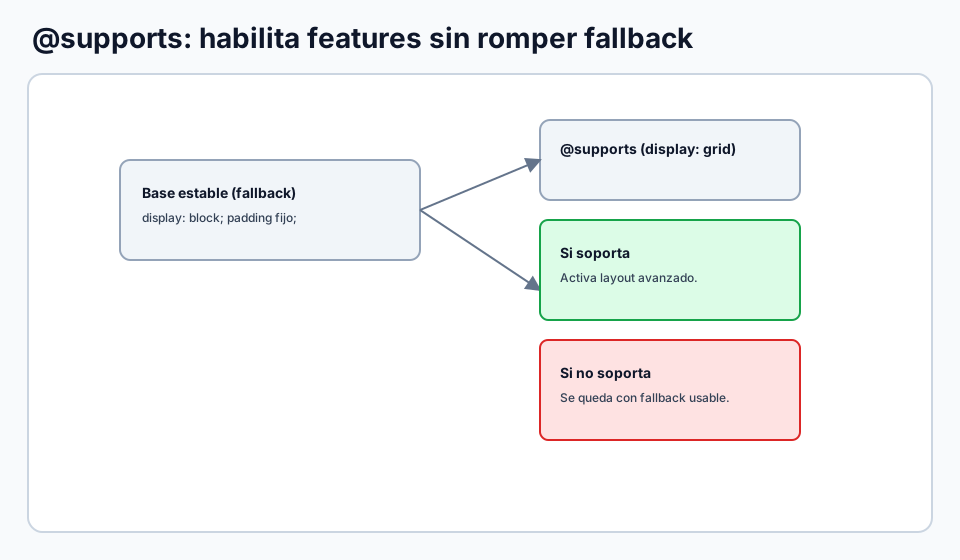
Progressive enhancement with `@supports`

Shows how to enable modern features without breaking browsers with less support.

Decision flow for supports with a supported branch and a fallback branch.

🧪 Learn by doing

Example Demo: resilient layout This example starts with a safe Flexbox card layout and upgrades to modern Grid only if the browser supports it.
Example Interactive demo: masonry with `grid-lanes` plus fallback See how an experimental layout can rely on `@supports` to activate `grid-lanes` only when available, while keeping a usable `columns` fallback.
Example Challenge: detect `subgrid` Apply a green background if the browser supports `subgrid`, and a red one if it does not, using `not`.

What is this?

I'm Cristian Eslava and I sometimes build websites so both you and I can learn and experiment. culTest

I made this in February 2026 to make learning easier for my students. The idea is to learn web development by practicing and to keep expanding the project with new topics, tests and challenges.

It draws inspiration from MDN, W3Schools, CodePen, Manz and many other web development references. I wanted to combine useful theory, runnable examples, challenges and the testing system I had already built for culTest. culTest

If you liked it, if you didn't, or if you want to get in touch, write to me at cristianeslava@gmail.com