← Back to CSS
51

Scroll-Driven Animations: scroll-linked motion without JavaScript

Learn how to connect CSS animations directly to scrolling with `scroll()` and `view()`, so you can build reading progress bars, reveal effects and parallax scenes with better performance and much less code.

📘 Theory

Using `scroll()` as a global timeline

This is the right tool when the whole document or container should control the animation progress.

1

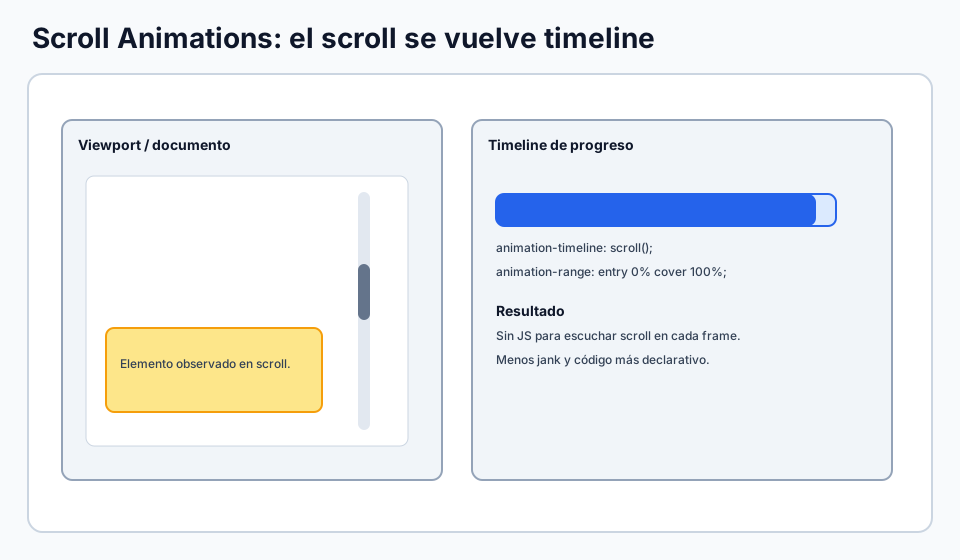
The `scroll()` function creates a timeline based on how far a scroll container has moved. Instead of saying an animation lasts 600 milliseconds, you say the animation follows the scroll position.

2

A perfect first use case is a reading progress bar. At the top of the article the bar is empty. At the bottom it reaches full width. The animation feels smooth because the browser ties it directly to scrolling.
Using `view()` to reveal elements

When the timing depends on when a specific element enters the viewport, `view()` is the more natural fit.

1

Unlike `scroll()`, the `view()` timeline is based on how visible the element itself is inside the scroll area. That makes it ideal for cards, sections and illustrations that should animate when they come into view.

2

The `animation-range` property lets you refine exactly when the effect starts and ends. With values such as `entry`, `cover` and `exit`, you can create reveals that feel intentional instead of abrupt.

🧭 Key visuals

How a scroll timeline works

Useful for understanding the relationship between entry points, cover range and visual progress.

Diagram showing how scroll progress becomes an animation timeline in CSS.

Scroll-driven animations in context

Reinforces the idea of connecting motion and scrolling without a JavaScript-heavy setup.

Visual summary of modern scroll-driven animations in CSS

How `view()` decides when to animate

Helps you see when an element starts animating as it enters the viewport.

Diagram of the `view()` function for CSS animations based on element entry and coverage

🧪 Learn by doing

Example Demo: reading progress and reveal-on-scroll Scroll the content and watch the top bar grow while the cards animate into place as they enter the viewport.
Example Interactive demo: CSS-only scroll reveal Explore a fuller `view()` demo with side entrances, upward motion and scale changes without depending on JavaScript.
Example Interactive demo: lines and progress tied to scroll See bars, underlines and SVG strokes synced with `scroll()` and `animation-range`.
Example Interactive demo: CSS-only parallax Walk through a richer parallax composition with multiple layers to study depth, rhythm and readability.

🏁 Challenges

Challenge Challenge: native parallax Use `animation-timeline: scroll()` so the background moves with a slower rhythm than the foreground content.

What is this?

I'm Cristian Eslava and I sometimes build websites so both you and I can learn and experiment. culTest

I made this in February 2026 to make learning easier for my students. The idea is to learn web development by practicing and to keep expanding the project with new topics, tests and challenges.

It draws inspiration from MDN, W3Schools, CodePen, Manz and many other web development references. I wanted to combine useful theory, runnable examples, challenges and the testing system I had already built for culTest. culTest

If you liked it, if you didn't, or if you want to get in touch, write to me at cristianeslava@gmail.com