← Back to CSS
36

CSS Subgrid

Learn how to inherit parent grid rows or columns so independent child components align to the same structural guides.

📘 Theory

The limitation of regular Grid

Without `subgrid`, nested components often drift out of alignment.

1

Imagine a row of cards where one title wraps into two lines and another stays on one line. The image, summary or CTA under that title may end up starting at different vertical positions in each card.

2

With plain nested Grid, every card builds its own internal structure independently. `subgrid` is valuable because it lets those internal pieces follow the same parent-defined guides.
How to activate `subgrid`

The child must already be part of the parent grid before it can inherit anything.

1

The usual sequence is simple: the parent defines the grid, the child is positioned inside that grid, and the child then becomes a grid itself.

2

Instead of redefining its own tracks, the child uses `grid-template-columns: subgrid` or `grid-template-rows: subgrid`.

3

One especially useful detail is that line names can be inherited too, which keeps larger layouts easier to reason about.

Gaps and spacing

Inheritance does not mean every spacing decision has to stay identical.

1

By default, a subgrid follows the parent gap values. However, CSS also lets you override those gap values on the child when that improves the internal rhythm.

2

That makes `subgrid` especially useful for editorial or dashboard interfaces where the outer layout spacing and inner component spacing should not always feel the same.

Limits and best use cases

It is powerful, but not every nested component needs it.

1

If a design does not need strict alignment between repeated components, `subgrid` may add complexity without returning much value.

2

It is most worth using when several modules must share the same visual baseline or column rhythm, such as cards in a listing or repeated dashboard panels.

Browser support

It is usable today, but compatibility checks still matter.

1

Modern browser support is strong, but you should still confirm compatibility if the project has legacy requirements.

2

In many projects, a graceful fallback is enough because `subgrid` usually improves precision rather than unlocking the only possible layout.

Performance impact

Use it intentionally, not anxiously.

1

In most realistic use cases, `subgrid` does not introduce a meaningful performance penalty on its own.

2

As with any advanced layout feature, the main risk is not one declaration but overly complicated nesting that becomes hard to debug and maintain.

The design problem it solves

Subgrid is really about shared visual guides.

1

Picture three cards with a title, an image and a short paragraph. If the titles have different heights, the next internal blocks no longer line up neatly.

2

With `subgrid`, the card effectively tells the parent layout: reuse your tracks here too, so my internal content aligns with the rest of the row.

Basic `subgrid` syntax

The child becomes a grid and borrows the parent tracks.

1

To use it, the element must already be a child of a Grid container and must also set `display: grid`.

2

Instead of redefining the row or column sizes, you use the `subgrid` keyword.

What changes visually

The difference becomes obvious when repeated components vary in content length.

  • Without `subgrid`: each component adapts only to its own content, so internal blocks drift out of line.
  • With `subgrid`: headings, media and buttons can align to a shared rhythm across the whole row or section.

🧭 Key visuals

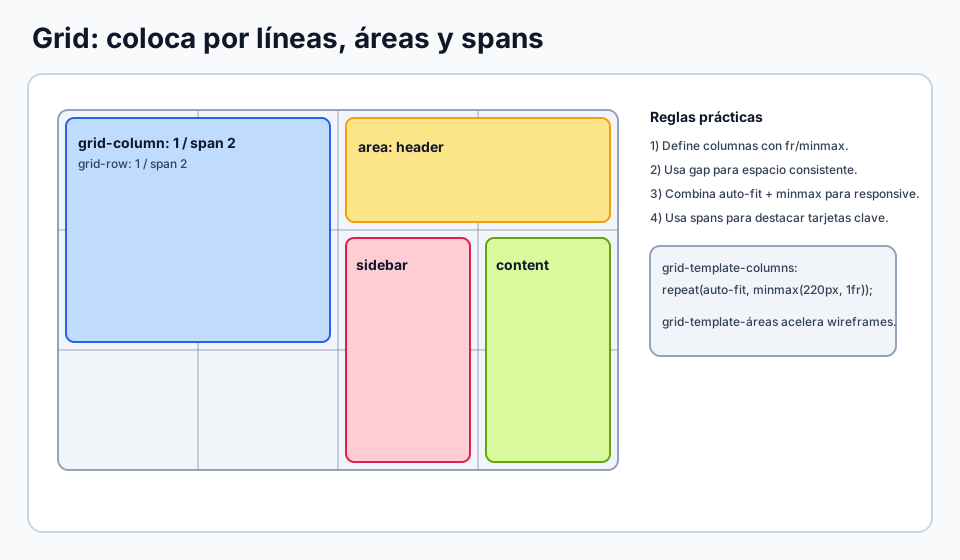
Subgrid inheriting the parent mesh

Shows how internal content can align to the same structural guides defined by the outer layout.

Visual example of a parent grid reused by internal components through subgrid.

🧪 Learn by doing

Example Subgrid lab Toggle `subgrid` on and off and watch how the cards either align cleanly or drift apart.
Example Demo: the card baseline problem See how the button row stays aligned even when the text above it varies in height.
Example Challenge: vertical alignment with `subgrid` Make the images in this gallery start at the same height even though the captions have different lengths.

🧰 Resources

Test

Check your knowledge with a test about CSS.

Test for CSS

What is this?

I'm Cristian Eslava and I sometimes build websites so both you and I can learn and experiment. culTest

I made this in February 2026 to make learning easier for my students. The idea is to learn web development by practicing and to keep expanding the project with new topics, tests and challenges.

It draws inspiration from MDN, W3Schools, CodePen, Manz and many other web development references. I wanted to combine useful theory, runnable examples, challenges and the testing system I had already built for culTest. culTest

If you liked it, if you didn't, or if you want to get in touch, write to me at cristianeslava@gmail.com