← Back to CSS
37

`position: relative` and `absolute`: references, offsets and overlays

Master the most important positioning pair in CSS: use `relative` to create a local reference and `absolute` to leave the flow without losing control.

📘 Theory

Relative: move the box without losing its place

The element still keeps its original space in the layout even when you shift it visually.

1

With `relative`, the browser reserves the same space in the document flow, so sibling elements do not rearrange themselves.

2

That makes it useful for small visual adjustments, but even more valuable as the reference point for absolutely positioned children.

3

If you use `top`, `left`, `right` or `bottom` with `relative`, think of the result as a visual offset, not a structural reflow.
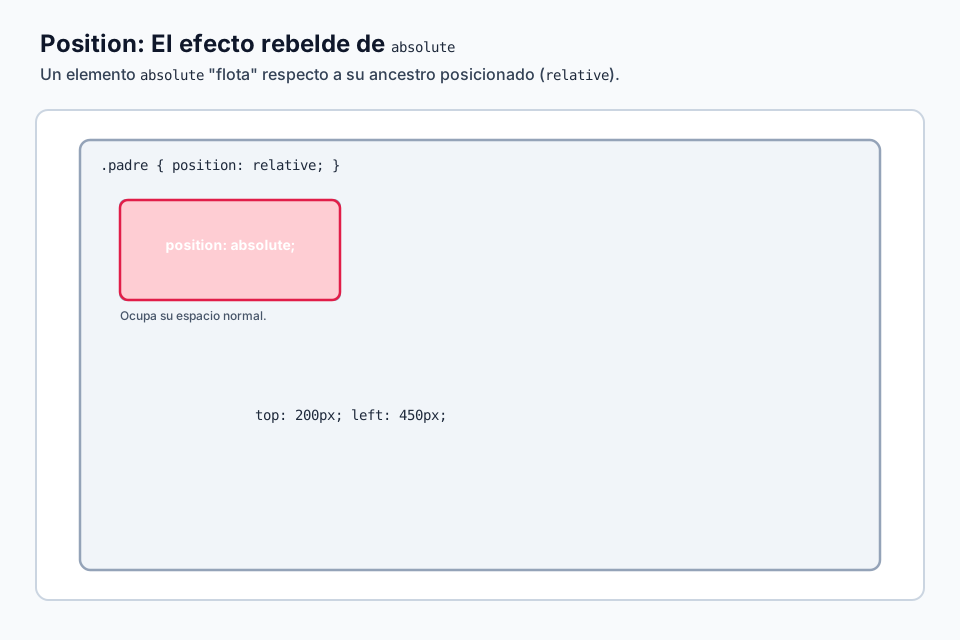
Absolute: leave the flow and look for a reference

An absolutely positioned element stops pushing its siblings and needs a clear anchoring context.

Once you apply `position: absolute`, the box no longer participates in normal document flow. That gives you layering freedom, but it also demands more intention.

The browser calculates `top`, `right`, `bottom` and `left` relative to the nearest positioned ancestor. In practice, that usually means the parent should explicitly use `position: relative`.

Without that anchor, the element often feels random because it starts taking the viewport as its coordinate system.

  • Use `absolute` for overlays, badges, tooltips and embedded controls.
  • Avoid using it as a replacement for whole-page layout that Grid or Flexbox now solve much better.
  • If something jumps to the wrong place, first inspect which ancestor actually has `position` defined.

Real patterns where they work together

The real value appears when you understand the pair as one system.

1

Badge on a card

The card uses `relative` and the badge uses `absolute` so it can sit in a corner without disturbing the content.

2

Tooltip

A button or wrapper creates the local context with `relative`; the tooltip bubble leaves the flow with `absolute`.

3

Icon inside an input

The field keeps its normal box while the icon is layered on top in a controlled position.

4

Hotspot over an image

Interactive dots can be placed precisely on top of a relative image wrapper.

Common mistakes

Most `absolute` bugs repeat the same few causes.

  • Applying `absolute` without defining a reference container.
  • Using offsets without thinking about which edge or corner should control the position.
  • Trying to build full structural layouts with `absolute` instead of using modern layout systems.
  • Forgetting that an absolutely positioned layer can block clicks, text selection or focus if you ignore size and stacking.

🧭 Key visuals

Relative and absolute as one positioning system

Use it to lock in the core idea of the lesson: `relative` defines the origin and `absolute` uses that origin for precise placement.

Diagram comparing normal flow with an absolutely positioned element referenced by a relative container.

🧪 Learn by doing

Example Interactive demo: how `relative` behaves Adjust offsets and observe how the element moves visually while keeping its original space in the flow.
Example Interactive demo: `absolute` and its reference container See how anchoring changes when the parent is `relative`, and what happens when that reference disappears.

🏁 Challenges

Challenge Challenge: absolute badge inside a card Build a classic UI pattern with `relative` on the container and `absolute` on the badge.

🧰 Resources

Test

Check your knowledge with a test about CSS.

Test for CSS

What is this?

I'm Cristian Eslava and I sometimes build websites so both you and I can learn and experiment. culTest

I made this in February 2026 to make learning easier for my students. The idea is to learn web development by practicing and to keep expanding the project with new topics, tests and challenges.

It draws inspiration from MDN, W3Schools, CodePen, Manz and many other web development references. I wanted to combine useful theory, runnable examples, challenges and the testing system I had already built for culTest. culTest

If you liked it, if you didn't, or if you want to get in touch, write to me at cristianeslava@gmail.com