📘 Theory

When you need a loop and when you do not

If a task repeats over data, you probably need iteration.

Processing carts, looping through messages, summing daily sales, validating inputs or generating reports all share the same trait: a sequence of elements to inspect or transform.

If you only need a one-time check, an `if` may be enough. If you need to repeat an operation many times, that is where loops enter the picture.

1

for

Ideal when you know how many times you need to iterate.

  • Loop through arrays by index
  • Generate numeric ranges
2

while

Useful when the condition controls the process.

  • Retry until success
  • Read until a valid value appears
3

break

Stop execution before the loop naturally finishes.

  • Exit once a value is found
  • Cut an unnecessary search short
4

continue

Skip specific iterations.

  • Ignore invalid values
  • Filter without extra structures

A safe `for` loop: the base pattern that rarely fails

If you control the limits and the index, you solve most of the problem.

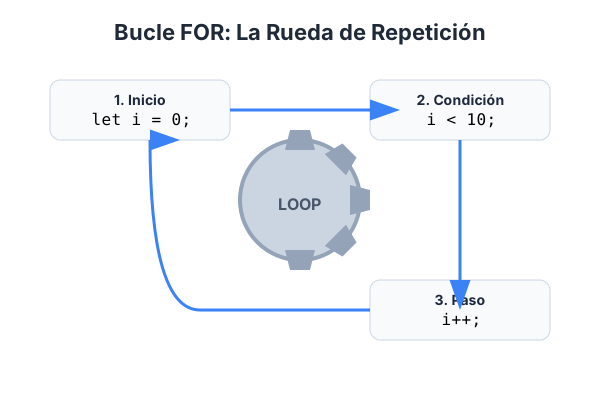
The classic `for` pattern has three parts: initialization, condition and update. Always read it in that order when you debug it.

In arrays, use `i array.length` and avoid `=` unless you intentionally need a different bound.

  • If `undefined` appears in the console, check the index boundaries first.
  • If the total stays at 0, verify that the accumulator updates inside the loop.
  • Use clearer names such as `index` or `currentValue` when the example gets more complex.

A controlled `while`: useful, but it requires discipline

`while` is powerful, but you must update the control state on every pass.

1

`while` runs as long as the condition stays true. If you never change the variable involved in that condition, you get an infinite loop.

2

Think of `while` as a process that continues until something happens: until a result is found, until attempts run out or until valid input appears.

`break` and `continue` in realistic scenarios

They give you finer control over the flow inside an iteration.

1

Use `break` when you already found what you were looking for and continuing would add no value. That improves both performance and clarity.

2

Use `continue` when you want to skip invalid cases without wrapping the whole body in a giant `if`.

Common loop errors and how to avoid them

The same failures appear again and again, so spotting them fast is part of becoming professional.

1

Error one: off-by-one boundaries such as using `=` instead of ``. Error two: forgetting to increment or decrement in a `while`. Error three: declaring an accumulator inside the loop and resetting it by mistake.

2

Before blaming JavaScript, print the index, the current value and the control variable. With that trace, the bug usually falls apart quickly.

🧭 Key visuals

Loops in JavaScript

It visualizes controlled repetition and the criteria that end an iteration.

Diagram of iteration with for, while and stop-control statements

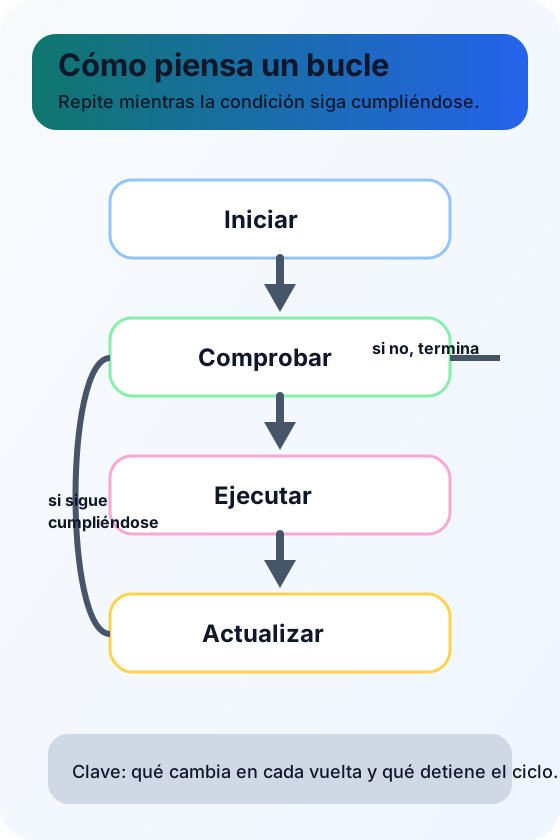
The basic iteration cycle

It works as a mental map of the full cycle and makes the relationship between condition, update and stopping point much easier to understand.

Visual scheme showing start, check, execute and update inside a loop

🧪 Learn by doing

Example Guided example: calculate total stock across warehouses Use a `for` loop to sum units from several warehouses and decide whether there is a shortage risk.
Example Guided example: `while` with a maximum number of attempts Simulate a form submission retry until success or until the maximum number of attempts is reached.
Example Interactive demo: checkout summary with a loop Enter comma-separated amounts and the system will calculate the total, the average and how many valid amounts it processed.

🏁 Challenges

Challenge Challenge 1: find the largest value in an array Loop through the array with `for` and store the biggest value in `max`.
Challenge Challenge 2: use `while` until you find a valid value Move through a list until you find the first positive number and save its position.

What is this?

I'm Cristian Eslava and I sometimes build websites so both you and I can learn and experiment. culTest

I made this in February 2026 to make learning easier for my students. The idea is to learn web development by practicing and to keep expanding the project with new topics, tests and challenges.

It draws inspiration from MDN, W3Schools, CodePen, Manz and many other web development references. I wanted to combine useful theory, runnable examples, challenges and the testing system I had already built for culTest. culTest

If you liked it, if you didn't, or if you want to get in touch, write to me at cristianeslava@gmail.com