← Back to Programming Fundamentals
01

What Programming Really Is: Solving Problems with Clear Instructions

Learn what programming means from scratch, how to think in terms of input, process, and output, and how to read a simple program as a logical sequence instead of technical magic.

📘 Theory

What a Program Solves in Practice

A program turns a real need into a sequence of executable instructions.

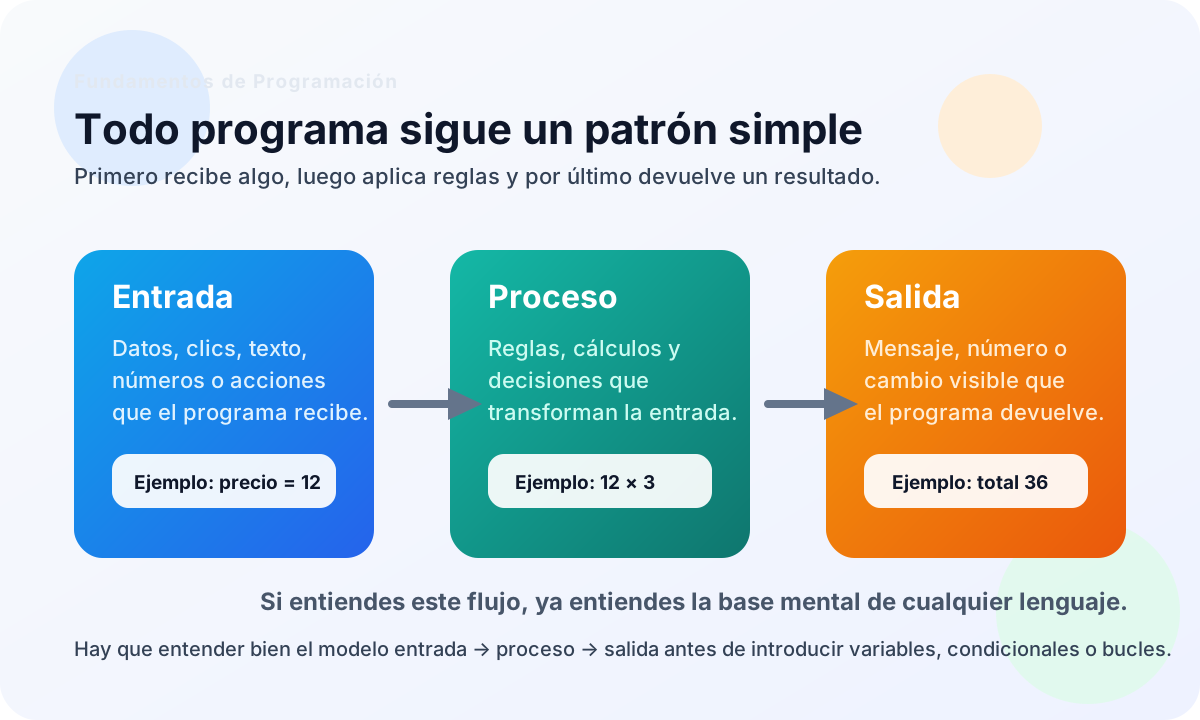
A calculator, a login form, a search tool, or a task list may look very different, but they all follow the same logic: they receive input, apply a process, and produce an output.

That pattern is the common language of programming. If you internalize it early, variables, conditionals, and loops will feel much more natural later.

Thinking this way also helps you avoid a common beginner mistake: assuming programming is just random syntax without a clear problem behind it.

  • Input: what the system receives.
  • Process: the rules or steps it applies.
  • Output: the observable result.
  • Validation: checking whether the result makes sense.
Think Like a Programmer Without Obsessing Over Syntax

At the beginning, the key skill is not typing fast. It is breaking problems down well.

Computational thinking means splitting a large problem into smaller parts, spotting repeated patterns, keeping only what matters, and ordering a solution so it can be repeated reliably.

That is why a strong start in programming does not begin with flashy frameworks. It begins with understanding clear processes. Without that base, every language feels harder than it really is.

We will use very simple JavaScript as the teaching vehicle, but the important part of this lesson is not the language. It is the mental model.

1

Decomposition

Break a problem into small manageable tasks.

2

Patterns

Notice what repeats so you do not reinvent the solution every time.

3

Abstraction

Keep what matters and ignore noise that does not affect the decision.

4

Sequence

Order instructions so a person or a machine can follow them without doubt.

A Program Makes Sense When You Follow Its Sequence

Before learning more complex structures, get used to reading what happens first, what happens next, and why.

1

Sequential execution is the first behavior you should master: the program reads and runs instructions in order, unless later you teach it to decide or repeat.

2

This is also the foundation of debugging. If the result is strange, the question is not 'what magic happened?', but 'at which step did the process go wrong?'

Pseudocode: Think Before You Type

Pseudocode helps you validate the logic before worrying about exact syntax.

1

You do not always need to start with final code. Often it is smarter to write the steps first in structured human language, as if you were giving instructions to another person.

2

This habit reduces blank-page panic and exposes gaps in your logic. If you cannot explain a process clearly, you probably cannot program it clearly yet.

🧭 Key visuals

The basic map of a program

This fixes the core mental pattern of the course before variables, conditionals, or loops appear.

A teaching diagram showing how a program receives input, applies a process, and produces an observable output.

🧪 Learn by doing

Example Guided Example: A Sequence Without Mystery Watch how the program communicates its order of steps explicitly.
Example Guided Example: Read a Program as Input, Process, and Output We use direct values here, but the real goal is spotting the logic of the flow.

🏁 Challenges

Challenge Challenge: Describe a Payment Algorithm in 3 Steps Write three console lines that represent input, process, and output for a simple payment flow.

What is this?

I'm Cristian Eslava and I sometimes build websites so both you and I can learn and experiment. culTest

I made this in February 2026 to make learning easier for my students. The idea is to learn web development by practicing and to keep expanding the project with new topics, tests and challenges.

It draws inspiration from MDN, W3Schools, CodePen, Manz and many other web development references. I wanted to combine useful theory, runnable examples, challenges and the testing system I had already built for culTest. culTest

If you liked it, if you didn't, or if you want to get in touch, write to me at cristianeslava@gmail.com