← Back to CSS
39

Modern positioning and interaction

Understand modern CSS positioning as a predictable system for layering, interaction and structure, not as an old patching tool.

📘 Theory

Key ideas at a glance

A quick review of the concepts that matter most in modern positioning work.

1

Positioning as a system

Modern CSS positioning is most useful when you think in terms of references, layers and interaction instead of isolated properties.

2

The `inset` shorthand

`inset` compresses `top`, `right`, `bottom` and `left` into one readable declaration.

3

`sticky` as a hybrid

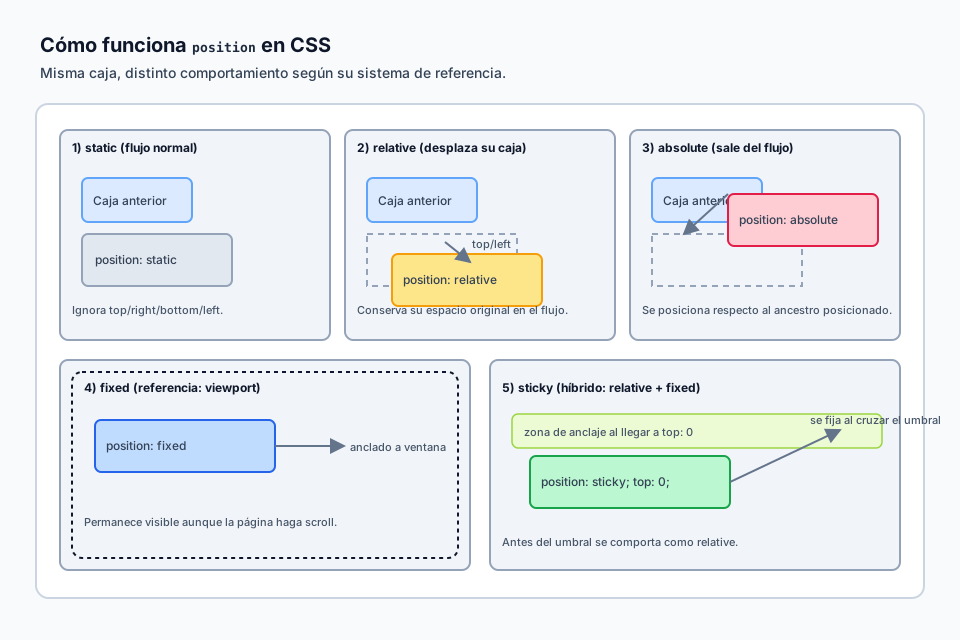
`sticky` starts in the flow and then locks itself in place when a scroll threshold is reached.

4

Centering with `inset`

With known dimensions, `inset: 0` plus `margin: auto` can center an absolutely positioned box cleanly.

5

Stacking contexts matter

Positioning is not only about movement. It also affects how layers compete visually.

6

Readable modern syntax

Modern positioning code is often shorter and easier to reason about than older combinations of offsets and transforms.
Modern positioning and interaction

Today, positioning properties combine with newer shorthand syntax and browser behavior that make the code much more legible than older CSS approaches.

Historically, placing an absolute element into the corners often meant writing four separate properties. Now we can use `inset`, which is shorthand for `top`, `right`, `bottom` and `left`.

Old style: `top: 0; right: 0; bottom: 0; left: 0;`.

Modern style: `inset: 0;`.

You can also combine values, for example `inset: 10px 20px;`, which means 10px on top and bottom and 20px on the sides.

`position: sticky` deserves special attention because it blends flow participation with scroll anchoring. It behaves like a normal positioned element until a threshold is reached, then sticks within the boundaries of its container.

Another major modern idea is the stacking context. Properties such as `opacity` below 1, `filter`, `transform` or even newer containment-related features can create a new layering context automatically. That means a `z-index: 999` inside one context can still appear underneath a `z-index: 1` outside of it.

If an element uses `position: absolute` or `fixed` and you know its dimensions, you can often center it perfectly without transforms or manual calculations.

  • The `inset` shorthand
  • `position: sticky` as the hybrid mode
  • `absolute` positioning and stacking contexts
  • Centering with `inset: 0` and `margin: auto`

🧭 Key visuals

Position reference systems for modern UI

A quick reference diagram for choosing between relative, absolute, fixed and sticky in interface work.

Comparison of CSS position modes in interface scenarios with overlays and sticky elements.

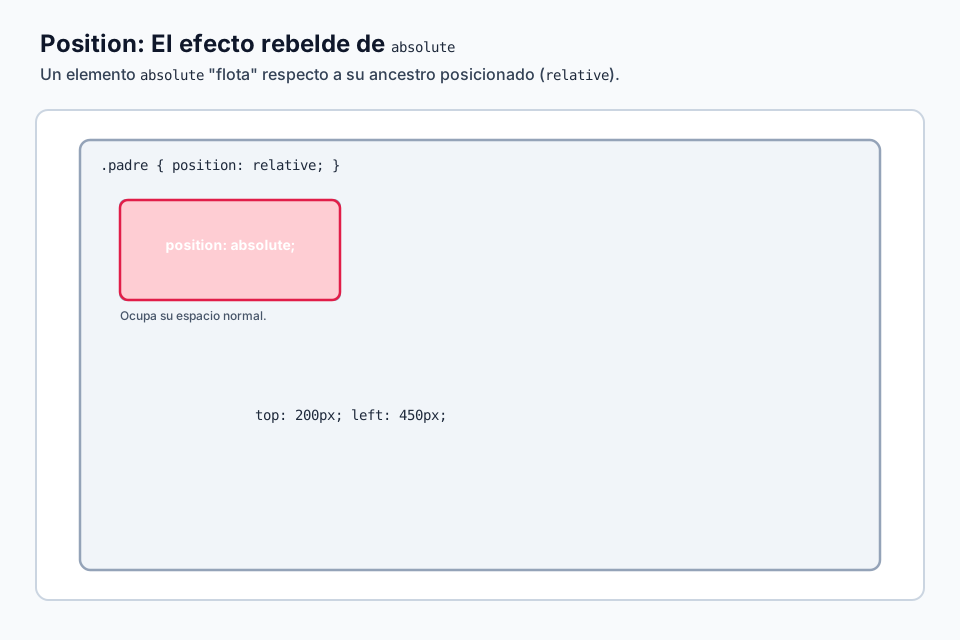
Absolute positioning and its reference context

Reinforces how `absolute` leaves the normal flow and takes a new origin from a positioned ancestor.

Diagram of `position: absolute` relative to the nearest positioned ancestor.

🧪 Learn by doing

Example Interactive demo: position in a realistic context Compare `static`, `relative`, `absolute`, `fixed` and `sticky` inside a complete demo with scroll and layered UI.
Example Centered absolute element with `inset` If an element has `position: absolute` or `fixed` and known dimensions, it can often be centered without transforms.
Example Interactive demo: popover and dialog with modern layering See how `dialog`, `popover` and positioning work together to create more robust overlay patterns.

🏁 Challenges

Challenge Challenge: sticky menu Keep an aside visible while the user scrolls through the content.

🧰 Resources

Test

Check your knowledge with a test about CSS.

Test for CSS

What is this?

I'm Cristian Eslava and I sometimes build websites so both you and I can learn and experiment. culTest

I made this in February 2026 to make learning easier for my students. The idea is to learn web development by practicing and to keep expanding the project with new topics, tests and challenges.

It draws inspiration from MDN, W3Schools, CodePen, Manz and many other web development references. I wanted to combine useful theory, runnable examples, challenges and the testing system I had already built for culTest. culTest

If you liked it, if you didn't, or if you want to get in touch, write to me at cristianeslava@gmail.com